AI AGENTS
Build Your AI Agents
The Agent Builder is Complete's conversational tool for creating custom AI agents. Simply describe what you want your agent to do — in natural language — and Agent Builder will create a working agent with a test application.
✦ Why Agent Builder? Build custom agents for unique workflows, industry-specific tasks, or any use case where pre-built agents don't quite fit. No coding required — just conversation.
How Agent Builder Works
Agent Builder is itself an AI agent that helps you build other agents. You start a conversation with Agent Builder and it guides you through the process by asking questions about your agent's behaviour, tone, and purpose.
The entire process happens conversationally — you describe what you want in natural language, and Agent Builder creates the agent using LangGraph (a framework for building stateful AI agents), tests it, and lets you refine it iteratively until it behaves exactly how you need.
⚠️ Hackathon Note: LangGraph agents require you to provide your own LLM API keys (OpenAI, Anthropic, AWS Bedrock, etc.). Agent Builder will guide you through adding these credentials to your agent's configuration.
🔮 Coming Soon: Direct access to Complete's LLMs for LangGraph agents is in development. If you need this for your project, reach out to the Complete team — we may be able to provide access on a case-by-case basis. Contact us in the hackathon Discord.
Getting Started
Start a Conversation with Agent Builder
Mention @Agent Builder in any channel or DM and describe the agent you want to create. Agent Builder will start asking clarifying questions.
Answer Agent Builder's Questions
Agent Builder will ask about the agent's name, how it should behave, the flow of conversation, and the tone it should use. Describe these in natural language — just like you're explaining it to a person.
Agent Builder Creates Your Agent
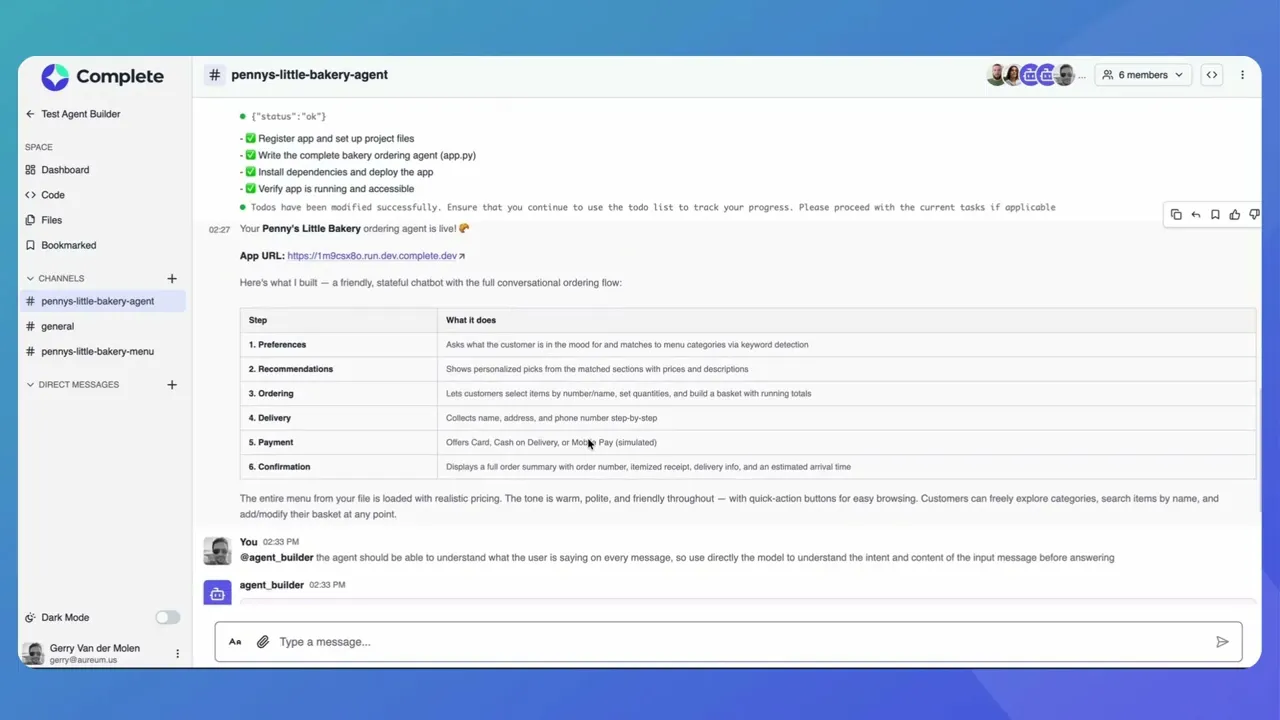
Agent Builder uses a plan to build all necessary components for your agent. It will create the agent logic and automatically generate a test web application where you can interact with your agent immediately.
Test Your Agent
Agent Builder provides a URL to a live test application. Open it, interact with your agent, and see if it behaves as expected. Test different scenarios and edge cases.
Refine and Iterate
If something doesn't work as expected, tell Agent Builder what needs to change. It will update the agent and provide a new test URL. Keep iterating until your agent works perfectly.
Test and Use Your Agent
Once satisfied, your agent is ready to use. Agent Builder generates a test web application with a live URL where you can interact with your agent. The agent itself is a LangGraph application that you can integrate into your projects or deploy as needed.
✦ Important Clarification: LangGraph agents built with Agent Builder are standalone applications — they don't automatically appear in Complete's workspace Agent Library. Think of them as custom AI applications you build and deploy yourself, rather than built-in workspace agents like @code or @product.
What to Describe When Building an Agent
The more specific you are, the better your agent will perform. Here's what to focus on:
Purpose— What should the agent do? What problem does it solve?
Conversation Flow— Describe step-by-step how the agent should interact. What questions should it ask? In what order?
Tone & Style— Should it be formal, friendly, concise, conversational? Give examples if helpful.
Rules & Constraints— What should it always do? What should it never do?
Context & Knowledge— Reference any Files or menus or documentation the agent should know about.
💡 Best Practice:Describe your agent's behaviour in natural language, just like you're training a new team member. Agent Builder interprets conversational instructions and builds the agent accordingly.
Technical Details
Agent Builder creates agents using LangGraph — a framework for building stateful, multi-step AI workflows. Your agents are built as LangGraph applications that can maintain conversation state, call external APIs, and handle complex multi-turn interactions.
⚠️ LLM Provider Requirements (Hackathon): Currently LangGraph agents require you to provide your own LLM API keys. You can use:
• OpenAI (GPT-4, GPT-3.5) — easiest to set up
• Anthropic (Claude) — via API
• AWS Bedrock — Claude via AWS (tell Agent Builder: "use Bedrock with Claude")
• Any other provider your LangGraph agent can connect to
Agent Builder will guide you through adding these credentials to your agent's.envfile.
🔮 Coming Soon: Direct access to Complete's LLMs for LangGraph agents is coming soon. If you need this for your hackathon project, please reach out to the Complete team — we'd love to hear your use case and may be able to provide access at our discretion. Contact us in the hackathon Discord channel.
📖 Want to see it in action? Check out the step-by-step tutorial where we build a food ordering agent from scratch.
Example Use Cases
Order Assistants — help customers order from your menu, product catalog, or service offerings
Onboarding Guides — answer new hire questions using your internal documentation
Customer Support — handle common questions and troubleshooting with your help docs
Internal Tools — automate expense reporting, time-off requests, or equipment ordering
Specialist Advisors — legal compliance checker, HR policy guide, technical documentation assistant
Join our Community Forum
Any other questions? Get in touch